
Getting visitors to your website is an ongoing challenge for many website owners. Search engine optimization, social media marketing, and online advertising can all help attract an audience, but there is another strategy worth considering: encouraging existing visitors to share your content with other people.
This approach is commonly known as referral marketing or viral marketing. It uses personal recommendations to introduce a website, product, or service to a wider audience.
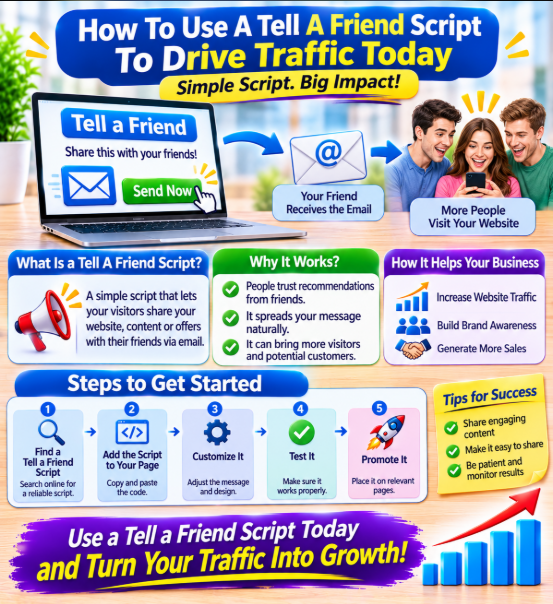
One simple way to encourage this behavior is by adding a Tell a Friend feature to your website. When implemented responsibly, this feature makes it easier for visitors to recommend useful content to their friends, family members, and colleagues.
What Is a Tell a Friend Script?
A Tell a Friend script is a website feature that allows visitors to share a page, article, product, or other content with someone they know.
Traditionally, these scripts included a small form where visitors could enter their name, email address, and the recipient’s email address. The website would then send a message containing a link to the shared content.
Modern sharing features can work in several ways, including:
- Email sharing: Opens an email application with a prepared message and the page link.
- Social sharing: Allows visitors to share content through supported social media platforms.
- Messaging apps: Makes it easier to send a page through messaging services.
- Native device sharing: Uses a device’s built-in sharing menu when supported by the browser.
The main purpose is to reduce the effort required for visitors to recommend something they find useful or interesting.
Why Can a Tell a Friend Feature Help Increase Website Traffic?
People often discover websites through recommendations from people they know. When someone shares a helpful article, entertaining video, useful resource, or interesting product, the recipient may decide to visit the original website.
This creates an opportunity to reach people beyond your existing audience.
A Tell a Friend feature can offer several benefits:
1. Encourage Personal Recommendations
A recommendation from someone a visitor knows can attract attention to content that might otherwise go unnoticed. People may be more willing to explore a website when the link comes with a personal explanation.
2. Increase Content Exposure
Every genuine share creates another opportunity for your content to reach a new audience. If recipients find the material useful, they may share it with others.
However, sharing does not guarantee that content will become viral. The result depends on its relevance, usefulness, appeal, and the willingness of people to recommend it.
3. Attract Potential Customers
For an online business, referrals can introduce products and services to people who may already have an interest in them. Visitors who arrive through relevant recommendations may become potential customers.
4. Build Brand Awareness
When people repeatedly encounter useful content from your website through recommendations, they may become more familiar with your brand and what your business offers.
How to Add a Tell a Friend Feature to Your Website
Adding a sharing feature does not necessarily require building a complicated system from scratch. The best implementation depends on your website platform and the sharing methods you want to support.
Here are some practical steps.
Step 1: Choose a Suitable Sharing Method
Decide how visitors should share your content. For many websites, an email-sharing link and a mobile-friendly sharing option are good starting points.
If your website uses a content management system, check whether it already provides sharing functionality through its built-in features or reputable extensions.
Step 2: Choose a Reliable Tool or Script
If you use a third-party script or plugin, select a reputable provider. Review its documentation, security practices, privacy policy, maintenance history, and compatibility with your website.
Avoid copying unknown code from untrusted websites. A poorly maintained script could introduce security vulnerabilities, slow down your pages, or collect information unnecessarily.
Step 3: Customize the Sharing Message
Make the sharing experience simple and relevant. A useful message should explain what the recipient will find when opening the link.
For example:
“Hi! I found this article useful and thought you might enjoy it too. Take a look here: [Page Link]”
Allow visitors to personalize the message when appropriate. Avoid misleading subject lines or promotional language that makes the message appear to come from someone who did not actually recommend the content.
Step 4: Place the Feature Where Visitors Can Find It
Consider adding sharing options to pages where people are likely to find something worth recommending, such as:
- Helpful articles and tutorials.
- Product pages and buying guides.
- Interesting videos and other media.
- Useful resources and downloadable materials.
- Special offers that visitors may genuinely want to share.
Keep the sharing controls visible without interfering with the main content or navigation.
Step 5: Test the Feature
Before making the feature widely available, test it on desktop computers, tablets, and mobile devices.
Check that:
- The correct page URL is shared.
- The message is clear and properly formatted.
- Sharing links open the intended application or service.
- The feature works with keyboard navigation where applicable.
- No unnecessary personal information is collected.
- The sharing controls do not slow down or disrupt the website.
Important Privacy and Anti-Spam Considerations
A Tell a Friend feature should make voluntary sharing easier—not turn your website into a source of unsolicited email.
The original approach of asking visitors to enter another person’s email address and automatically sending a promotional message can create privacy and spam concerns.
A more responsible implementation should follow these practices:
- Let visitors choose whether they want to share content.
- Avoid uploading or storing recipients’ contact details unless genuinely necessary.
- Do not automatically add recipients to marketing mailing lists.
- Make the sender and purpose of any email clear.
- Avoid sending bulk promotional messages through personal referral forms.
- Follow applicable privacy and anti-spam requirements.
- Provide clear information about how any collected data is used.
An especially simple alternative is to let visitors share a page through their own email or messaging application. This keeps the visitor in control of the message and the recipient.
Tips for Making Your Sharing Strategy More Effective
Installing a Tell a Friend feature is only the beginning. Visitors need a good reason to share your content.
Use these strategies to improve the chances of receiving genuine referrals.
Publish Content Worth Sharing
Create content that solves problems, answers questions, explains useful ideas, or provides an enjoyable experience. People are more likely to recommend something when they believe it will benefit someone else.
Make Sharing Easy
Avoid complicated forms and unnecessary steps. A clear sharing option placed near relevant content can make the process more convenient.
Focus on the Right Audience
Consider who would benefit most from your content. A useful article shared with a relevant audience may generate more meaningful visits than a large number of unrelated shares.
Encourage Sharing Without Pressuring Visitors
A simple invitation such as “Found this helpful? Share it with a friend” is often sufficient. Do not use misleading incentives or pressure people to share content.
Measure Referral Traffic
Use website analytics to identify visits that come from referral links and sharing channels. Monitor engagement, conversions, and the performance of the pages visitors share most often.
This information can help you understand which content deserves further improvement and promotion.
Conclusion: Make It Easier for Visitors to Recommend Your Website
A Tell a Friend feature is a straightforward way to encourage visitors to share content with people they know. It can help expand your reach, introduce new visitors to your website, and create opportunities for future customers.
However, a sharing script alone cannot guarantee a steady flow of traffic. Its effectiveness depends on the quality of your content, the relevance of your audience, the ease of sharing, and the trust people have in your website.
Start with a reliable, privacy-conscious sharing method, place it where it is genuinely useful, and monitor the results. Combined with valuable content and a broader digital marketing strategy, personal recommendations can become a useful source of long-term website growth.
