
The internet contains an enormous amount of information, and finding the right content can sometimes be difficult. Even when useful information is available, visitors may struggle to locate it if a website is poorly organized.
This is why website content taxonomy is important.
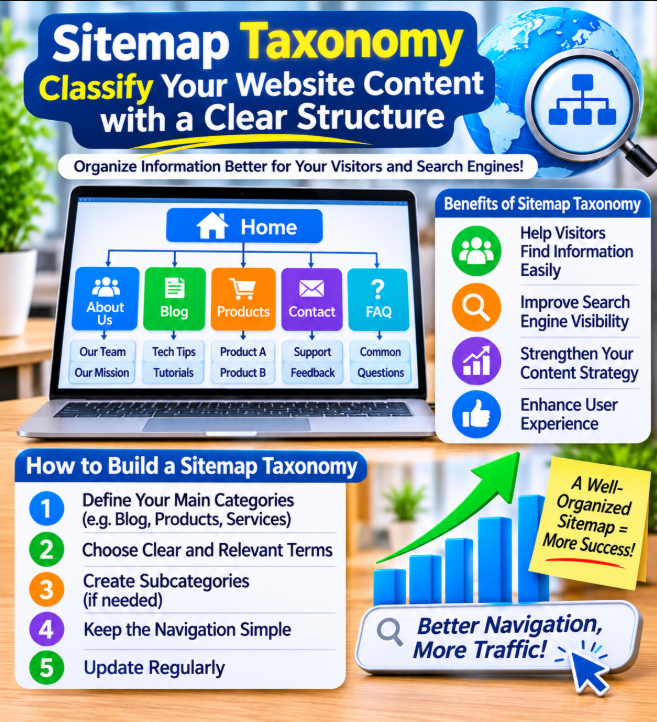
Website taxonomy is the process of classifying and organizing content into meaningful categories and subcategories. A well-planned taxonomy helps visitors understand how information is structured and makes it easier to find relevant content.
For website owners, an effective content taxonomy can also support digital marketing strategies, improve the user experience, and make website management more efficient.
In this guide, we will explore the importance of website taxonomy, its impact on internet marketing, and practical steps for creating an effective content classification system.
What Is Website Content Taxonomy?
Website content taxonomy is a structured system used to classify information into related groups.
Instead of presenting website content as an unorganized collection of pages, taxonomy creates a logical structure that connects related topics.
For example, a technology website might organize its content into the following categories:
- Technology
- Smartphones
- Computers
- Software
- Internet
- Website Development
- Search Engine Optimization
- Online Security
- Tutorials
- Beginner Guides
- Technical Tutorials
- Tips and Tricks
This organization helps visitors understand where specific information belongs and how different topics are related.
It is important to understand that website taxonomy is not the same as an XML sitemap. Taxonomy organizes content into categories, while an XML sitemap lists URLs to help search engines discover website pages.
Both can contribute to a more organized website when used appropriately.
Why Is Website Taxonomy Important?
A website may contain valuable information, but that information becomes less useful when visitors cannot find it easily.
A good taxonomy helps solve this problem by creating a clear and understandable content structure.
1. Makes Information Easier to Find
Visitors generally expect websites to organize information in a logical way.
When related articles and pages are grouped together, users can browse relevant topics without having to search through unrelated content.
For example, someone looking for website development advice should be able to find related tutorials in one clearly identified section.
This reduces confusion and creates a more convenient browsing experience.
2. Reduces Information Overload
Websites that publish large amounts of content can become difficult to navigate.
Without proper classification, visitors may encounter too many unrelated links and categories.
A structured taxonomy separates information into manageable groups.
This makes the website easier to understand and helps visitors focus on the topics that interest them.
3. Supports Better Website Navigation
A consistent classification system provides a foundation for organizing menus, category pages, and internal links.
Visitors can understand the relationship between different sections and move between related topics more naturally.
It also helps website owners identify content that may be difficult to access.
4. Helps Organize Content for Search Engines
A logical website structure can help search engines discover and understand relationships between pages.
Descriptive category names, relevant internal links, and consistent URL structures can support better website organization.
However, a taxonomy alone does not guarantee higher search rankings. Content quality, technical accessibility, and other SEO factors remain important.
The Impact of Website Taxonomy on Internet Marketing
Website taxonomy can support internet marketing by helping potential customers find relevant information more easily.
The purpose of online marketing is to reach an audience that is interested in a particular product, service, or subject.
However, attracting visitors is only part of the process. A website must also help those visitors find the information they need.
1. Helps Visitors Discover Relevant Content
People often search online using different words and phrases to describe the same subject.
A well-organized website can group related information under familiar and descriptive categories.
This gives visitors additional ways to discover content, even when they do not know the exact title of an article.
2. Creates a Better Customer Experience
Visitors are more likely to become frustrated when they cannot find product information, service details, or answers to their questions.
A clear content classification system makes important information easier to access.
For businesses, this can support the customer journey by helping potential customers move from general information to more specific product or service details.
3. Supports Content Marketing Strategies
Content marketing often involves publishing articles, guides, tutorials, and other resources.
Without a consistent taxonomy, these materials can become difficult to manage.
A suitable category structure helps publishers organize their content and identify topics that deserve further development.
4. Can Support Business Opportunities
When visitors can find relevant information more easily, they can make better-informed decisions.
For example, an online store may organize its products into categories such as electronics, home appliances, and accessories.
Customers can then browse the sections that match their interests.
Although taxonomy does not directly guarantee additional sales, it can contribute to a smoother shopping and browsing experience.
How to Build an Effective Website Taxonomy
Creating a useful taxonomy requires more than simply collecting keywords and placing them into categories.
Website owners need to understand their content, their audience, and the terms visitors naturally use.
The following steps can help you develop a practical content classification system.
Step 1: Understand Your Website Content
Start by reviewing the pages, articles, products, and other resources available on your website.
Identify the main subjects covered by your content.
For example, a digital marketing website might focus on:
- Search Engine Optimization
- Social Media Marketing
- Content Marketing
- Email Marketing
- Website Development
These subjects can become the foundation of your main categories.
Step 2: Understand Your Audience
Think about the terms visitors are most likely to use when searching for information.
Avoid relying entirely on internal company terminology or advertising language.
Use clear and familiar category names that ordinary visitors can understand.
For example, a category called “Website Design” may be easier for general visitors to understand than an unfamiliar technical or promotional term.
Step 3: Create Logical Categories and Subcategories
Group related topics together and create subcategories only when they provide meaningful organization.
A simple example for a website about photography is:
- Photography
- Camera Guides
- Photography Techniques
- Editing Tutorials
- Equipment
- Cameras
- Lenses
- Accessories
- Inspiration
- Landscape Photography
- Portrait Photography
- Creative Projects
The goal is to make the content structure clear rather than creating unnecessary levels.
Step 4: Keep the Structure Simple
A taxonomy should be extensive enough to cover the website’s content but not so complicated that visitors become confused.
The original taxonomy guideline suggests keeping approximately two to seven subject areas under each level.
This can be used as a practical starting point, not a strict rule for every website.
If a category contains too many unrelated topics, consider grouping them into meaningful subcategories.
Step 5: Use Consistent Naming
Category names should follow a consistent naming style.
Avoid mixing technical terminology, advertising slogans, and unrelated expressions within the same navigation level.
Consistency makes the website easier to understand and maintain.
Step 6: Review and Improve Your Taxonomy
Website content changes over time.
New articles are published, existing pages are updated, and some topics become more important than others.
Review your taxonomy periodically to identify unnecessary categories, overlapping topics, and content that is difficult to find.
A good taxonomy should evolve alongside the website.
DIY Website Taxonomy: Should You Build It Yourself?
In many cases, the website owner or content manager is well positioned to create the initial taxonomy.
This is because the people responsible for publishing content usually have a better understanding of the subjects covered by the website.
Hiring a professional is another option, particularly for large websites with extensive content libraries.
However, regardless of who creates the taxonomy, the process should involve people who understand the website’s content and audience.
A useful taxonomy requires careful planning, testing, and continuous improvement.
Common Website Taxonomy Mistakes to Avoid
Even a well-intentioned classification system can become ineffective if it is not planned carefully.
Here are some common mistakes to avoid:
Creating Too Many Categories
Too many categories can make navigation confusing.
Focus on meaningful subject areas rather than creating a separate category for every small topic.
Using Unfamiliar Terms
Category names should reflect the language visitors understand.
Avoid unnecessary technical jargon and internal business terminology.
Creating Excessively Deep Structures
Visitors should not have to navigate through many levels to find basic information.
Keep the hierarchy understandable and prioritize important content.
Using Overlapping Categories
Two categories with nearly identical purposes can create confusion.
Review category definitions and make sure each section has a clear role.
Ignoring Website Updates
A taxonomy that worked well when a website had twenty articles may no longer be suitable after publishing hundreds of articles.
Review and adjust the structure as the website grows.
Final Thoughts
Website content taxonomy is an important part of creating an organized and user-friendly website.
By classifying information into logical categories and using familiar terminology, website owners can make their content easier to discover and manage.
An effective taxonomy also supports digital marketing by helping visitors locate relevant information and navigate the website more comfortably.
Remember that taxonomy is not a one-time task. It requires regular evaluation and adjustment as website content and audience needs change.
Start with a simple structure, organize related topics carefully, and improve your categories as your website grows.
A well-organized website makes information easier to access and creates a better experience for every visitor.
