
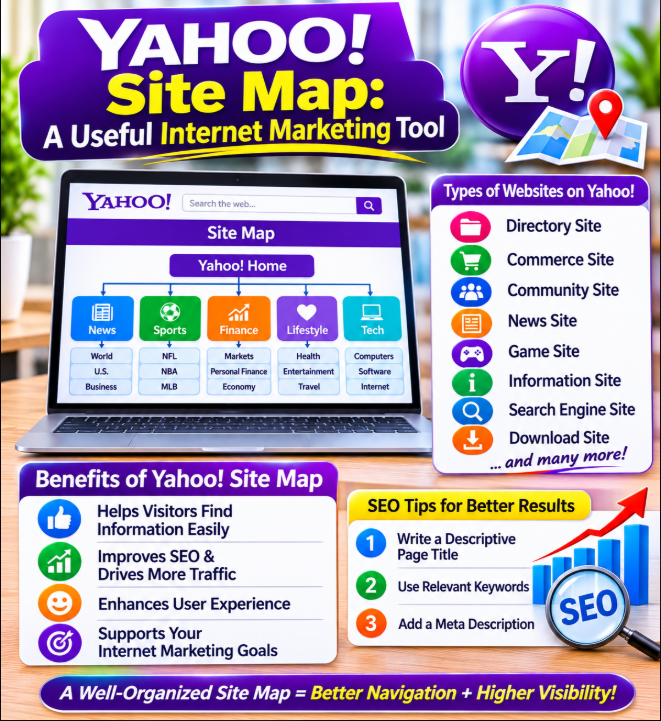
The internet contains millions of websites covering different topics, products, services, and resources. With so much information available, visitors need an effective way to find the content they are looking for. A well-organized website sitemap can help solve this problem.
A sitemap provides an overview of a website’s structure and helps visitors navigate its different sections. It can also help search engines discover important pages when implemented correctly.
Yahoo! is an interesting example of a large web platform that historically combined several types of online services, including search, directories, news, and other information resources. Its website structure illustrates why organizing large amounts of information is important.
In this article, we will explore what a website sitemap is, how it supports website navigation, and why it can be a useful part of an internet marketing strategy.
Understanding Different Types of Websites
A website is a collection of related web pages that can be accessed through a web browser using a common domain or root URL.
Websites can serve different purposes depending on the information, products, or services they provide.
Here are several common types of websites:
1. Archive Websites
Archive websites preserve digital materials and information for future reference. They may contain historical documents, photographs, publications, and other valuable resources.
2. Business Websites
Business websites introduce companies, promote their services, and provide information to potential customers.
They commonly include company profiles, service descriptions, contact information, and other business resources.
3. E-commerce Websites
E-commerce websites allow customers to browse products and purchase goods or services online.
Their content is often organized into product categories, subcategories, and individual product pages.
4. Community Websites
Community websites provide spaces where people with shared interests can communicate and exchange information.
Examples include discussion forums, online communities, and membership platforms.
5. Database Websites
Database websites allow visitors to search, retrieve, and explore information stored in structured databases.
6. Development Websites
Development websites provide resources related to software development, programming, website design, and other technical subjects.
7. Directory Websites
Directory websites organize information into categories and subcategories, allowing visitors to browse different subjects or services.
A well-known historical example of this website model is Yahoo’s web directory.
8. Download Websites
Download websites provide digital resources such as documents, applications, software, and other downloadable materials.
9. Gaming Websites
Gaming websites offer online games, gaming information, and interactive experiences for visitors.
10. Information and News Websites
Information websites publish educational and reference materials, while news websites provide current events, reports, and commentary.
11. Search Engine Websites
Search engine websites help visitors discover information across the internet by entering search queries.
12. Personal Blogs and Wiki Websites
Personal blogs publish articles, opinions, and experiences. Wiki websites allow multiple contributors to create and edit shared information.
Each website type has different organizational requirements. However, all websites benefit from clear navigation and a logical content structure.
What Is a Website Sitemap?
A website sitemap is a structured representation of the pages and sections available on a website.
It works similarly to the table of contents in a book. Instead of reading every page individually, visitors can use the sitemap to understand how the website is organized and locate specific information more easily.
A sitemap can be presented in different formats, including:
- HTML Sitemap: A website page containing organized links for human visitors.
- XML Sitemap: A structured file that provides search engines with information about important website URLs.
- Visual Sitemap: A diagram illustrating the hierarchy and relationships between website pages.
Each format serves a different purpose, but all contribute to a clearer understanding of website organization.
Why Is Yahoo! Sitemap an Interesting Example?
Yahoo! became widely recognized for combining several online services and information categories within one large web platform.
Its historical web directory offered an organized way for visitors to browse information through categories and subcategories.
For example, a directory structure could organize information into sections such as:
- News
- Sports
- Finance
- Entertainment
- Technology
- Business
Each main category could contain additional sections that help visitors locate more specific information.
This illustrates the importance of a logical website structure, particularly when a website contains a large amount of diverse content.
Although Yahoo’s services and website structure have evolved over time, the underlying lesson remains useful: organizing information makes large websites easier to explore.
How a Sitemap Helps Website Visitors
One of the main purposes of an HTML sitemap is to improve website navigation.
When a website contains many pages, visitors may not always know where to find specific information.
A sitemap provides an additional navigation resource by presenting important links in an organized format.
1. Makes Important Pages Easier to Find
Visitors can use a sitemap to locate important website sections without searching through multiple navigation menus.
2. Provides an Overview of Website Structure
A sitemap gives visitors a clearer understanding of the subjects and resources available on a website.
3. Creates a More Convenient Browsing Experience
When pages are organized logically, visitors can move between related sections more easily.
4. Supports Better Website Organization
A sitemap also helps website owners identify missing sections, confusing categories, and pages that may be difficult to access.
How a Sitemap Supports Internet Marketing
A website sitemap can contribute to internet marketing by helping visitors discover relevant information.
However, a sitemap is only one component of a broader digital marketing strategy.
Here are several ways an organized website can support online marketing activities.
1. Helps Visitors Discover Relevant Content
Visitors often explore websites without knowing the exact title or URL of the information they need.
Clear categories and descriptive links provide additional ways to discover relevant content.
This can make a website more useful to people interested in its products, services, or topics.
2. Supports Search Engine Discovery
An XML sitemap can help search engines discover important URLs, particularly on large websites, new websites, or websites with complex navigation.
However, submitting a sitemap does not guarantee that all submitted pages will be crawled, indexed, or ranked.
Search engines also use internal links and other discovery methods to find website content.
3. Improves Internal Content Organization
An effective website structure helps publishers organize articles and related resources.
For example, a digital marketing website could organize its content into:
- Search Engine Optimization
- Content Marketing
- Social Media Marketing
- Website Development
- Online Advertising
This structure makes related information easier to manage and explore.
4. Supports the Customer Journey
Business websites can use clear navigation to help visitors move from general information to more specific product or service pages.
For example, visitors might explore a service category, read a detailed explanation, and then visit the contact page.
A logical structure can make this journey more convenient.
Important SEO Strategies to Use Alongside a Sitemap
A sitemap alone is not enough to build a successful online presence.
Website owners should combine good website organization with useful content, technical SEO, and effective internal linking.
Here are several important practices to consider.
1. Write Descriptive Page Titles
Every important page should have a unique and descriptive title that accurately represents its content.
Avoid generic titles that do not explain what visitors can expect to find.
For example:
Instead of: “Our Services”
Consider: “Professional Website Design Services for Small Businesses”
The title should remain natural and accurately reflect the page.
2. Use Relevant Keywords Naturally
Identify the search terms that are relevant to each page and incorporate them naturally into the content.
Keywords can appear in appropriate places, including:
- Page titles
- Main headings
- Subheadings
- Introductory paragraphs
- Image alt text, when relevant
Avoid excessive keyword repetition. Content should be written primarily for people.
3. Create Useful Meta Descriptions
A meta description provides a short summary of a webpage.
Write a clear description that explains what visitors can expect when they open the page.
For example:
“Discover how website sitemaps improve navigation, organize content, and help search engines discover important website pages.”
A good description can help users understand the value of a search result, although Google may generate a different snippet depending on the search query.
4. Build Relevant Internal Links
Internal links connect related pages within the same website.
They help visitors discover additional information and provide search engines with ways to discover other pages.
For example, an article about website development could link to relevant tutorials, technical guides, and related resources.
5. Keep Your XML Sitemap Updated
Make sure your XML sitemap contains the correct canonical URLs of important pages.
Remove unnecessary URLs that point to broken pages, redirects, or duplicate versions of content.
If your website uses a content management system, check whether XML sitemap generation is already available.
6. Monitor Website Performance
Use tools such as Google Search Console to monitor indexing information, sitemap processing, and search performance.
Review any reported problems and investigate pages that are not being indexed as expected.
Remember that sitemap submission is a discovery aid, not a ranking guarantee.
Final Thoughts
A website sitemap is a useful tool for organizing information and making website navigation easier.
Yahoo!’s historical website directory provides an interesting example of how large collections of information can be organized into categories and subcategories.
For modern website owners, the same basic principle remains relevant: visitors should be able to find important information without unnecessary effort.
By combining a clear website structure, useful internal links, an accurate XML sitemap, and high-quality content, website owners can create a better browsing experience and support their internet marketing activities.
A sitemap cannot guarantee higher search engine rankings or increased traffic on its own. However, when used as part of a well-planned website strategy, it can contribute to a more accessible, organized, and useful online presence.
